> For the complete documentation index, see [llms.txt](https://docs.kick.co/llms.txt). Markdown versions of documentation pages are available by appending `.md` to page URLs; this page is available as [Markdown](https://docs.kick.co/accountants/close-workflows/tasks/accrual-tasks.md).
# Accrual Tasks
Automate your Accrual ledger review using tasks
**Accrual Tasks**
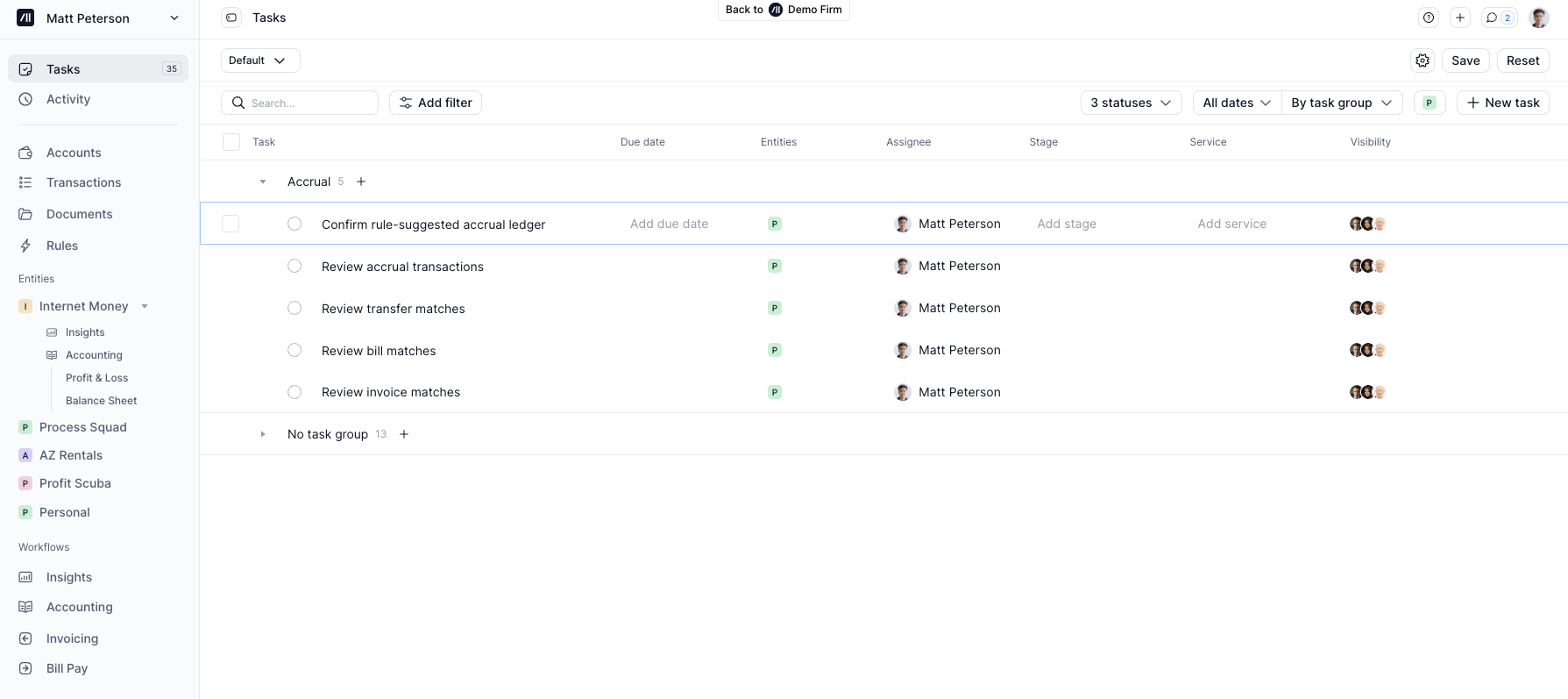
When the [Accrual ledger](/accountants/setting-up/ledgers.md#setting-up-the-accrual-ledger) is enabled for a client, Kick automatically generates tasks on the Tasks tab to guide your accrual review.
Tasks are organized into an Accrual group and cover five workflows:
1. Review invoice matches
2. Review bill matches
3. Review transfer matches
4. Confirm rule-suggested accrual ledger
5. Review accrual transactions
→ [Ledgers](/accountants/setting-up/ledgers.md)
***
### Review invoice matches
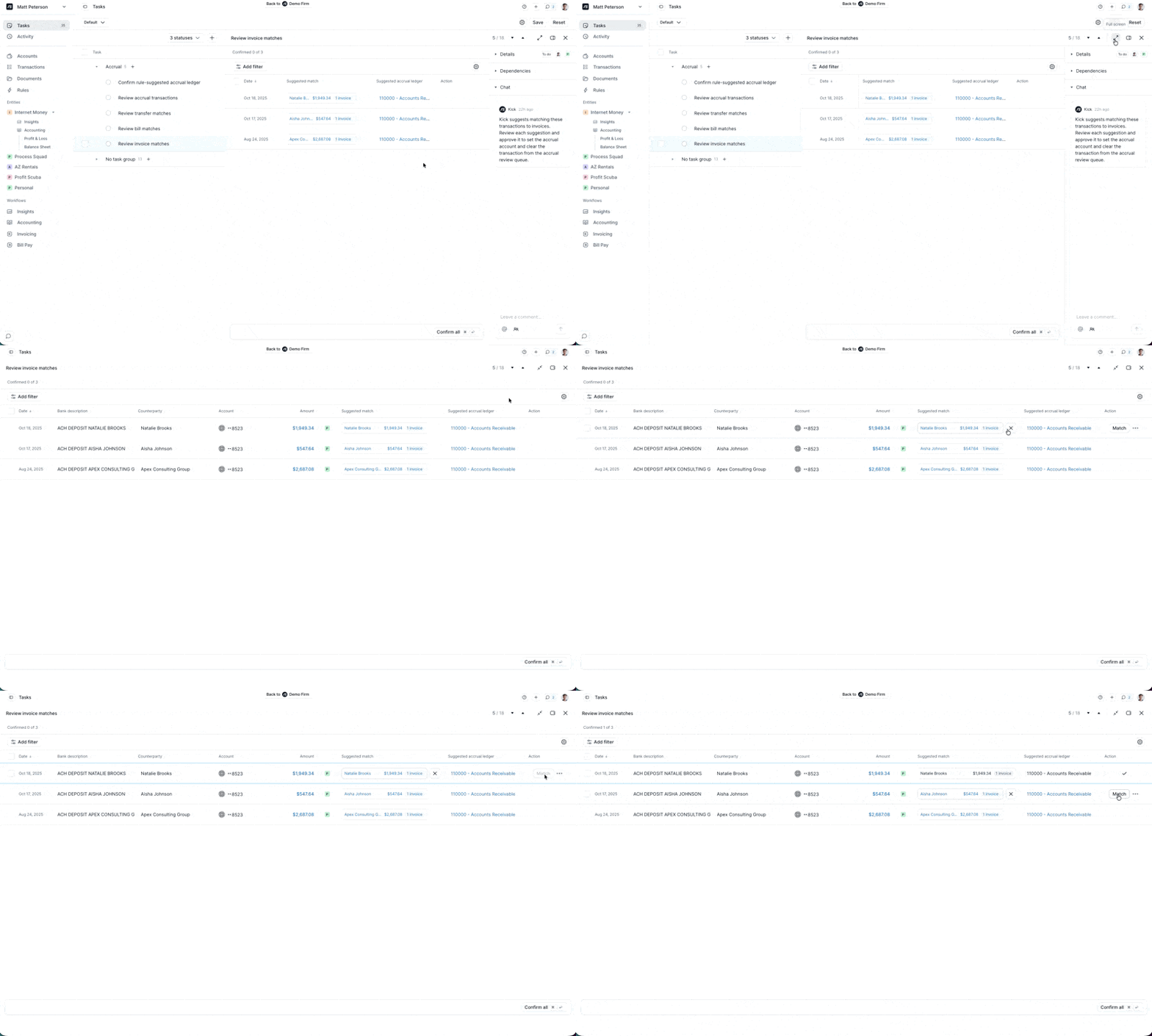
Kick proposes matches between incoming transactions and open invoices. When a payment applies to multiple invoices, Kick will propose multiple matches.
Confirming a match posts the transaction to Accounts Receivable (or a custom Receivables account) on the Accrual ledger rather than a revenue account, preventing double-counted revenue.
Matching is most accurate when invoices sync from a connected Stripe, Mercury, or BILL integration.
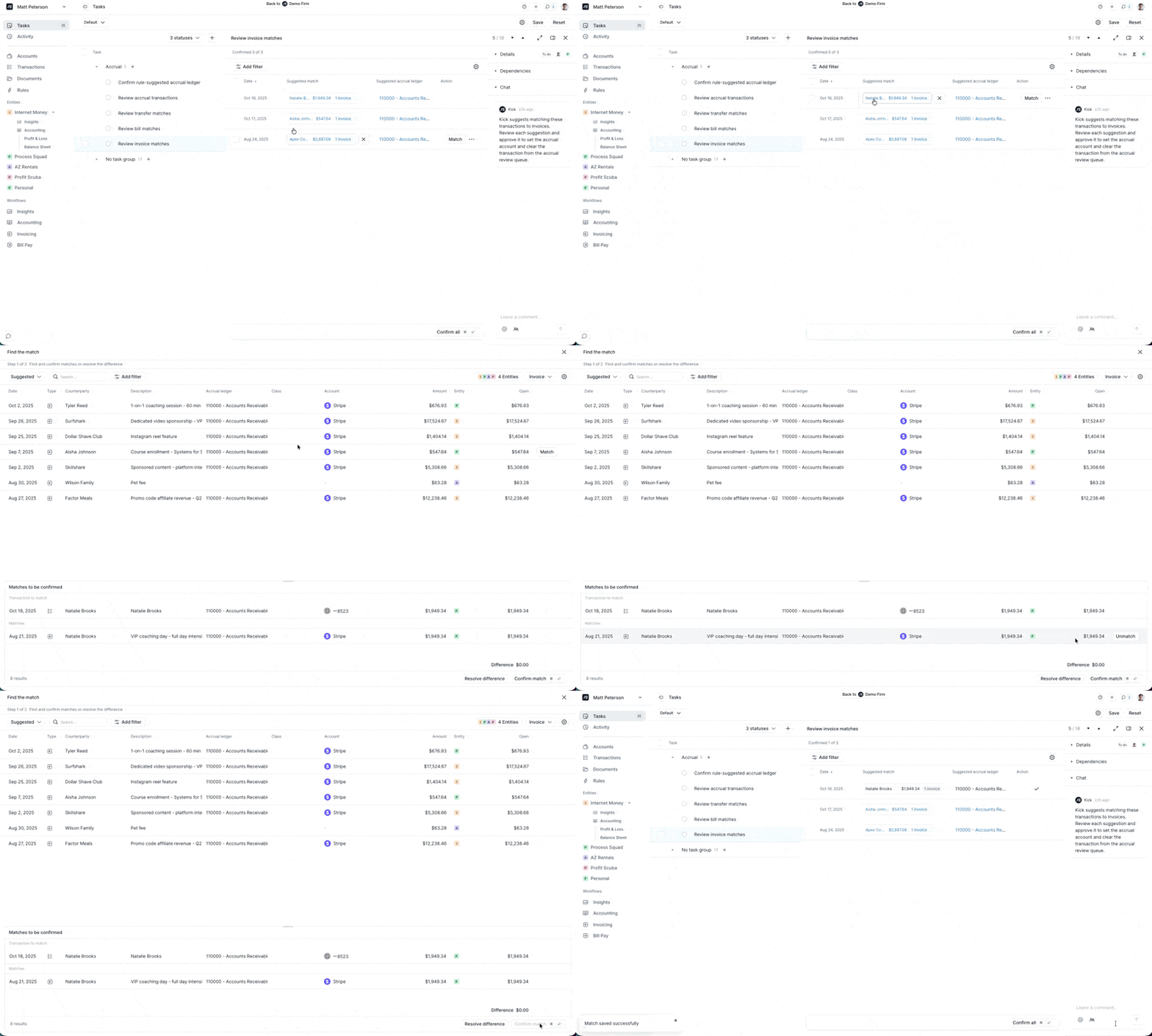
To inspect or edit a match, click on the suggested match.
{% hint style="info" %}
For more on how invoices sync and how to manage them, see [Invoicing](/accountants/bookkeeping-workflows/invoicing.md).
{% endhint %}
***
### Review bill matches
Kick proposes matches between outgoing transactions and open bills. When a payment applies to multiple bills, Kick will propose multiple matches. Confirming a match posts the transaction to Accounts Payable (or a custom Payables account) on the Accrual ledger rather than an expense account.
Matching is most accurate when bills sync from a connected Ramp or BILL integration.
{% hint style="info" %}
For more on how bills sync and how to manage them, see [Bill Pay](/accountants/bookkeeping-workflows/bill-pay.md).
{% endhint %}
***
### Review transfer matches
Kick surfaces transactions with a proposed transfer match — e.g. credit card payments matched to the corresponding payment in a credit card account, and bank-to-bank transfers within the same entity or across entities.
Confirm the proposed matches to post these transactions to transfer clearing accounts on the Accrual ledger.
→ [Transfers](/accountants/bookkeeping-workflows/transfers.md)
***
### Confirm rule-suggested accrual ledger
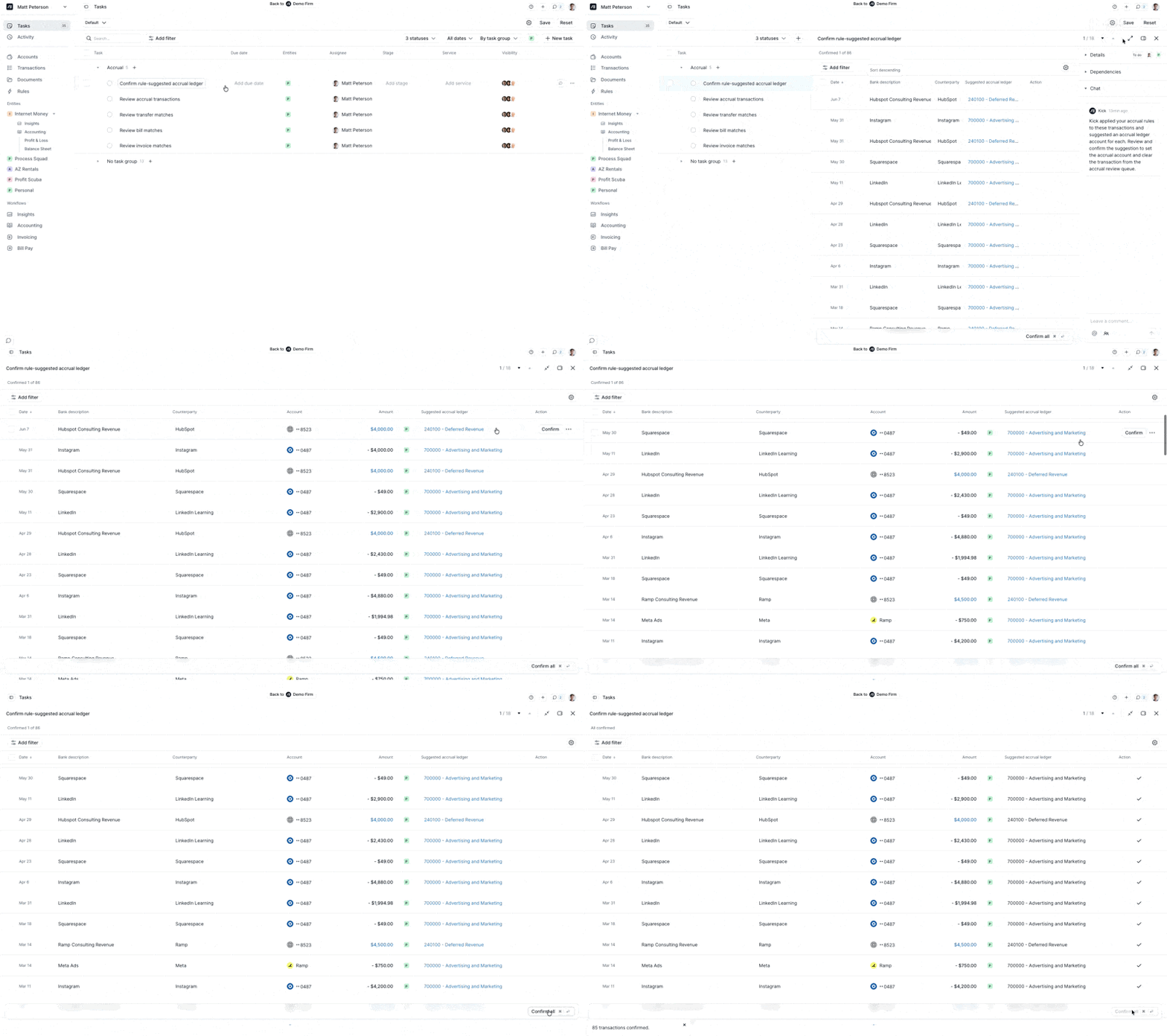
This task covers transactions where an accrual rule has proposed an Accrual ledger account, but auto-confirm was not enabled on the rule.
Review the proposed accounts and confirm individually or click **Confirm all** to post in bulk.
Since these transactions are governed by rules you created, bulk confirmation is the typical workflow — but you can adjust individual accounts before confirming if needed.
→ [Rules](/accountants/bookkeeping-workflows/rules.md)
***
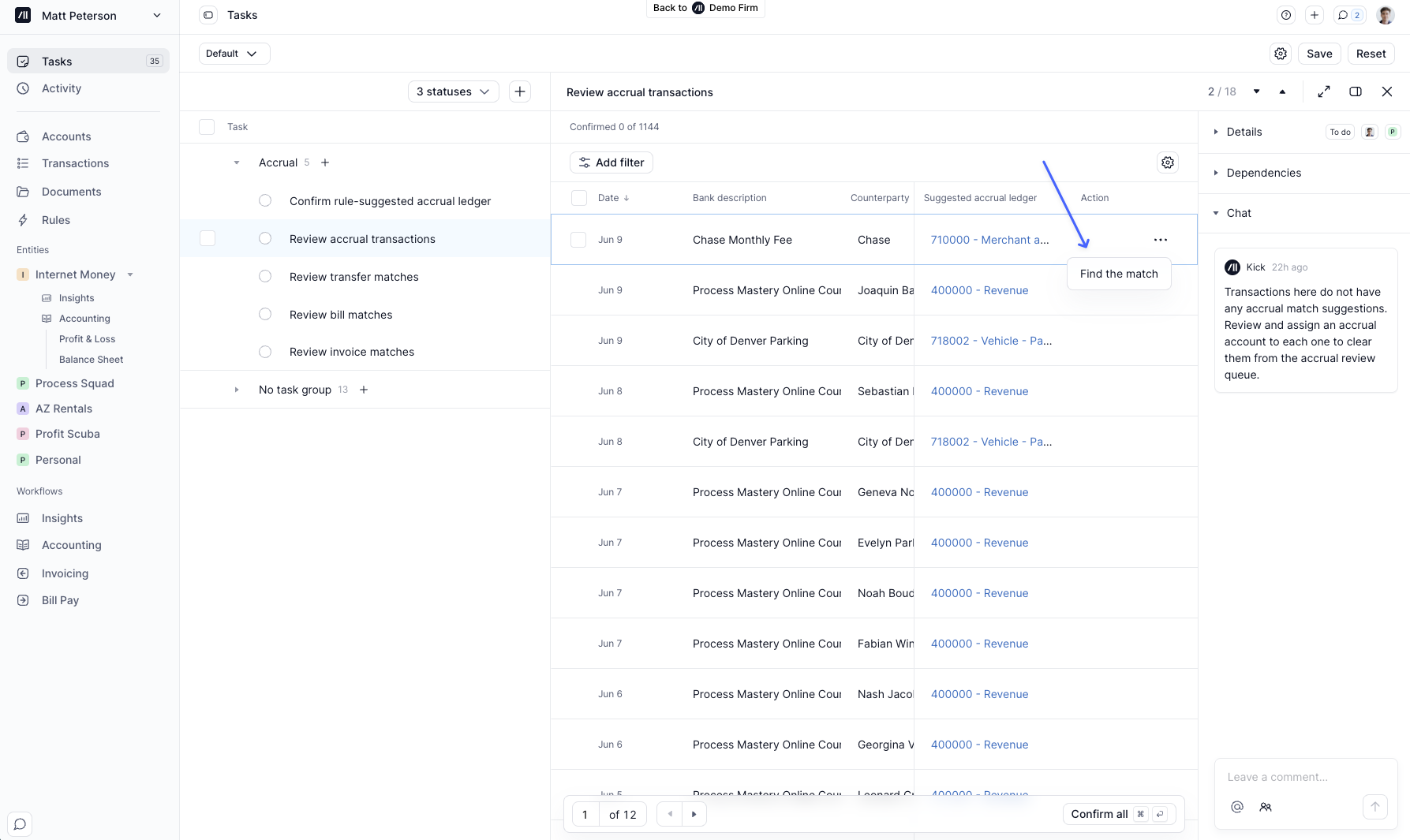
### Review accrual transactions
The "everything else" bucket. This task covers all transactions that have no proposed invoice match, bill match, transfer match, or accrual rule. For these transactions, Kick proposes posting to the same account as the cash ledger.
You can confirm transactions individually, or click **Confirm all** to post all of them to the Accrual ledger at once.
If Kick failed to propose an invoice, bill, or transaction match, it can be matched manually by hovering over the transaction → clicking the 3 dots menu → "Find the match."
Do I need to use Tasks to post to the Accrual ledger?
No, you can post directly from the Transactions tab, or enable **Auto confirm** in [Accrual rules](/accountants/bookkeeping-workflows/rules.md#accounting-rules) to handle it automatically.
I accidentally matched the wrong transaction to an invoice or bill. Can I un-match?
Yes. Immediately after matching, an undo button will appear. Click it to remove the match and reverse any journal entries on the Accrual ledger.
If you've already navigated away, go to the Transactions tab, find the transaction, open the Details panel, then select Actions and click the un-match icon.
---
# Agent Instructions
This documentation is published with GitBook. GitBook is the documentation platform designed so that both humans and AI agents can read, navigate, and reason over technical content effectively. Learn more at gitbook.com.
## Querying This Documentation
If you need additional information that is not directly available in this page, you can query the documentation dynamically by asking a question.
Perform an HTTP GET request on the current page URL with the `ask` query parameter, and the optional `goal` query parameter:
```
GET https://docs.kick.co/accountants/close-workflows/tasks/accrual-tasks.md?ask=&goal=
```
`ask` is the immediate question: it should be specific, self-contained, and written in natural language.
`goal` is optional and describes the broader end goal you are ultimately trying to accomplish on behalf of the user. GitBook uses it to tailor the answer towards what is most useful for that goal.
The response will contain a direct answer to the question and relevant excerpts and sources from the documentation.
Use this mechanism when the answer is not explicitly present in the current page, you need clarification or additional context, or you want to retrieve related documentation sections.