> For the complete documentation index, see [llms.txt](https://docs.kick.co/llms.txt). Markdown versions of documentation pages are available by appending `.md` to page URLs; this page is available as [Markdown](https://docs.kick.co/accountants/close-workflows/locks.md).
# Locks
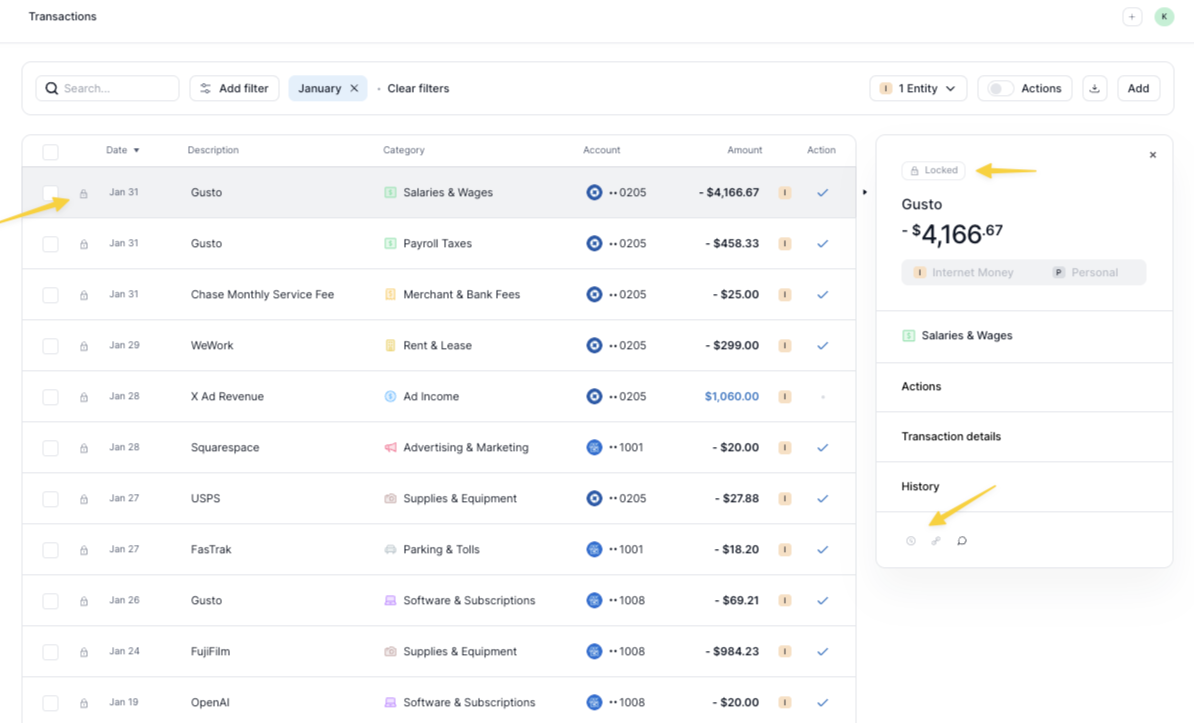
Locks prevent changes to transactions and journal entries prior to a selected date, protecting your completed work from being modified by other workspace members.
After closing a period, you can lock it to prevent any further changes. This ensures your finalized books stay intact and gives you a clear audit trail for closed periods.
***
### How to Lock a Period
1. Navigate to your profile icon in the top right.
2. Select **Locks**.
3. In the per-entity table, find the entity you want to lock.
4. In the **Lock up to** column, open the date picker and select the month to lock.
5. Click **Lock**.
The table shows **Status**, **Entity**, and **Lock up to** for each business entity.
**Note:** Setting a lock date locks that month and all prior months for the entity.
***
### How to Unlock a Period
1. Navigate to **Locks** from your profile icon.
2. Find the entity in the table.
3. In the **Lock up to** column, open the date picker for the locked entity.
4. Click **Unlock**.
{% hint style="warning" %}
**Important:** Unlocking a period will re-enable all restricted actions listed below. Any rules that apply to transactions in the unlocked period will begin processing again, and transaction data for accounts added during the locked period will sync retroactively. Review your rules and recent account additions before unlocking to avoid unintended changes.
{% endhint %}
***
### What Happens When a Period Is Locked
#### Client Access
If you have added your client as a Member, they will have view-only access to the locked period. This allows them to review reports without the risk of making changes.
#### Account Restrictions
* You cannot delete any account that has transactions within a locked period.
* If a new account is added to an entity with a locked period, transaction data will **not** sync for the locked dates. If the period is later unlocked, the transaction data will sync.
#### Rules
Automation rules skip financial-field updates on locked transactions (category, entity, counterparty, splits, and similar). Memo-only rule updates still apply to locked transactions.
***
### Restricted Actions
The following actions **cannot** be performed on transactions in a locked period:
* Changing categorization
* Changing entity assignment
* Changing vendor or customer assignment
* Matching or unmatching transactions
* Splitting or un-splitting transactions
* Assigning or removing classes
* Editing chart of accounts mapping
* Creating or deleting manual journal entries
### Allowed Actions
The following actions **can** still be performed on transactions in a locked period:
* Answering substantiation questions (e.g., "Who did you meet?" or "Where did you travel?")
* Adding memos
* Uploading and matching receipts
Who can edit locks?
Locks are not editable by certain roles. See [Roles & Permissions](/accountants/managing-clients/roles-and-permissions.md) for full details.
---
# Agent Instructions
This documentation is published with GitBook. GitBook is the documentation platform designed so that both humans and AI agents can read, navigate, and reason over technical content effectively. Learn more at gitbook.com.
## Querying This Documentation
If you need additional information that is not directly available in this page, you can query the documentation by asking a question.
Perform an HTTP GET request on the following URL with the `ask` and `goal` query parameters:
```
GET https://docs.kick.co/accountants/close-workflows/locks.md?ask=&goal=
```
`ask` is the immediate question: it should be specific, self-contained, and written in natural language.
`goal` is what the user is ultimately trying to achieve, the reason they need the answer. Sharing it helps GitBook give you a better, more relevant answer. A goal is most helpful when it describes the outcome the user wants rather than restating the question. For example, with `ask=how do I create an API token`, a goal like `automate deployments from our CI pipeline` lets GitBook tailor the answer to that use case.
The response will contain a direct answer to the question and relevant excerpts and sources from the documentation.
Use this mechanism when the answer is not explicitly present in the current page, you need clarification or additional context, or you want to retrieve related documentation sections.
.png?alt=media)