> For the complete documentation index, see [llms.txt](https://docs.kick.co/llms.txt). Markdown versions of documentation pages are available by appending `.md` to page URLs; this page is available as [Markdown](https://docs.kick.co/accountants/bookkeeping-workflows/consolidation/ownership-canvas.md).
# Ownership Canvas
Map ownership and other relationships between entities in a workspace.
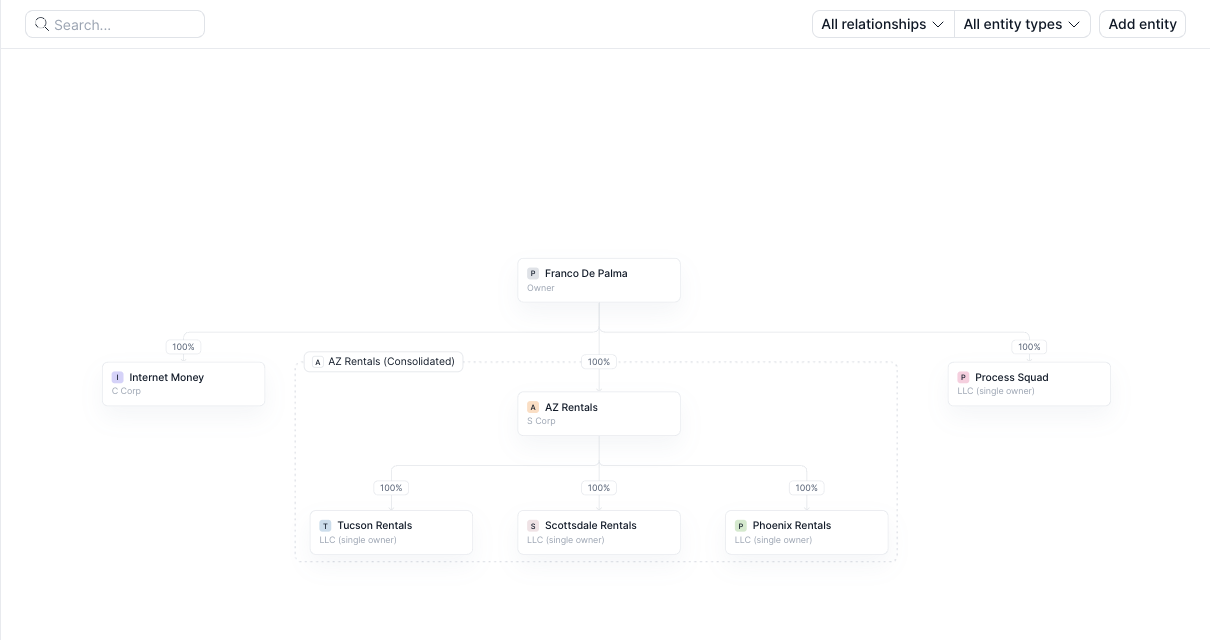
The Ownership canvas shows the businesses, owners, and relationships in a workspace. Use it to map the structure before creating a consolidation group.
***
### Before you start
Ownership is available for clients on Advanced or Enterprise. On other plans, **Ownership** doesn't appear in the navigation. If the client is on Advanced or Enterprise and you still don't see it, contact Kick support.
The workspace needs at least two entities before you can map relationships.
→ [Adding & Removing Entities](/accountants/setting-up/multi-entity/adding-and-removing-entities.md)
***
### Open Ownership
1. Open **Workflows** → **Ownership**.
2. Review the entity nodes and relationship lines on the canvas.
If the workspace has fewer than two entities, Kick shows **Ownership structure needs at least two entities**. Click **Add entity** to create another entity before mapping relationships.
***
### Use the toolbar
Use search and the filters above the canvas to narrow what you see:
* Search by entity name.
* Select **All relationships**, **Equity**, **Debt**, or **Transaction**.
* Select **All entity types** to show all entities, **Businesses**, or **Owners**.
The toolbar also includes:
* **Consolidate**, shown before the workspace has a consolidation group
* **Add entity**
***
### Navigate and arrange the canvas
Click and drag the canvas background to move around it. Use **Zoom in**, **Zoom out**, or **Fit view** to change the visible area.
Drag an entity node to place it where you want. Kick saves the layout for everyone in the workspace.
After a node has been moved, click **Restore automatic layout** next to the zoom controls, then confirm **Restore layout** to return the canvas to its generated arrangement.
{% hint style="warning" %}
**Restore automatic layout** updates the arrangement for everyone in the workspace. It does not change entity relationships.
{% endhint %}
***
### Add a relationship
1. Select an entity, then click **Add relationship** in the command bar. You can also drag a connection handle from one entity node to another.
2. Select a relationship type.
3. Select the two parties.
4. Add a **Label** or **Notes** when needed. Equity also supports **Ownership type**, and Debt supports **Payment**.
5. Click **Create**.
Kick supports three relationship types:
* **Equity**. Select the **Parent** and **Child**. New Equity relationships are fixed at 100%.
* **Debt**. Select the **Lender** and **Borrower**.
* **Transaction**. Select the **Payer** and **Payee**.
Existing Rent, Cash sweep, Management fee, Shared expenses, and Other relationships appear as **Transaction**.
***
### Review and update the structure
Select an item on the canvas to review its details:
* Select an entity to open **Details**, **Owners**, **Subsidiaries**, and **Relationships**.
* Select a relationship line to review its properties, then use **Edit** or **Delete** in the command bar.
* Select a line labeled **N relationships** to review bundled Transaction relationships between the same entities.
* Select the consolidation group pill to review its details, ledger basis, and reporting links.
{% hint style="warning" %}
To change the ownership structure of an active consolidation group, unconsolidate the group first. Relationship metadata can still be edited.
{% endhint %}
***
### Next step
After the parent and subsidiary relationships are mapped, create the consolidation group.
→ [Set Up a Consolidation Group](/accountants/bookkeeping-workflows/consolidation/set-up-a-consolidation-group.md)
---
# Agent Instructions
This documentation is published with GitBook. GitBook is the documentation platform designed so that both humans and AI agents can read, navigate, and reason over technical content effectively. Learn more at gitbook.com.
## Querying This Documentation
If you need additional information that is not directly available in this page, you can query the documentation by asking a question.
Perform an HTTP GET request on the following URL with the `ask` and `goal` query parameters:
```
GET https://docs.kick.co/accountants/bookkeeping-workflows/consolidation/ownership-canvas.md?ask=&goal=
```
`ask` is the immediate question: it should be specific, self-contained, and written in natural language.
`goal` is what the user is ultimately trying to achieve, the reason they need the answer. Sharing it helps GitBook give you a better, more relevant answer. A goal is most helpful when it describes the outcome the user wants rather than restating the question. For example, with `ask=how do I create an API token`, a goal like `automate deployments from our CI pipeline` lets GitBook tailor the answer to that use case.
The response will contain a direct answer to the question and relevant excerpts and sources from the documentation.
Use this mechanism when the answer is not explicitly present in the current page, you need clarification or additional context, or you want to retrieve related documentation sections.