> For the complete documentation index, see [llms.txt](https://docs.kick.co/llms.txt). Markdown versions of documentation pages are available by appending `.md` to page URLs; this page is available as [Markdown](https://docs.kick.co/accountants/bookkeeping-workflows/checks-and-deposits.md).
# Checks and Deposits
Record checks and deposits on the date they're written, track what's still outstanding, and clear each one against the bank when it arrives.
Record a check or deposit in Kick when it's written, before it reaches the bank. It posts to the books on that date, stays outstanding, and clears in reconciliation when the bank transaction arrives, without creating a duplicate.
Checks and deposits are available for clients on Basic, Plus, or Advanced.
***
### How a check moves through Kick
| Stage | What happens in Kick |
| ----------- | ------------------------------------------------------------------------------------------------------------------------------------------------------------------ |
| Recorded | A transaction posts to the bank account on the check's date, coded to the lines you entered. |
| Outstanding | The check stays unmatched until a bank transaction for the same amount arrives. It carries forward from one reconciliation to the next. |
| Cleared | In reconciliation, you match the check to the bank transaction that cleared it. The check keeps its date and coding, and the bank transaction is absorbed into it. |
| Reconciled | The check is part of a completed reconciliation and can't be deleted. |
Deposits follow the same stages in the other direction.
***
### Ways to add checks and deposits
* **One at a time.** Record a single check or deposit with its own lines and splits. → [Record a check or deposit](/accountants/bookkeeping-workflows/checks-and-deposits/record-a-check-or-deposit.md)
* **In bulk.** Type or paste up to 50 checks and deposits into a spreadsheet and import them together. → [Add multiple checks and deposits](/accountants/bookkeeping-workflows/checks-and-deposits/add-multiple-checks-and-deposits.md)
* **From a QuickBooks Online migration.** Checks and deposits that hadn't cleared in QuickBooks come over as outstanding. → [Migrated checks and deposits](/accountants/bookkeeping-workflows/checks-and-deposits/migrated-checks-and-deposits.md)
***
### Where to see them
There's no separate Checks page. Recorded checks and deposits live with the bank account's other transactions, and the Check and Deposit Detail report lists them in one place.
#### Transactions
Recorded checks and deposits appear on the Transactions tab with the other transactions on the bank account.
* A check icon marks each one. Hover it to see **Check** or **Deposit**.
* When a check has no description, its bank description is **Check #** followed by the reference number, or **Check** when there's no reference number. Deposits follow the same pattern with **Deposit**.
* A split check shows one row for each line.
The Transactions table has no reference number column. To see check numbers, use the **Reference no.** column in the Check and Deposit Detail report.
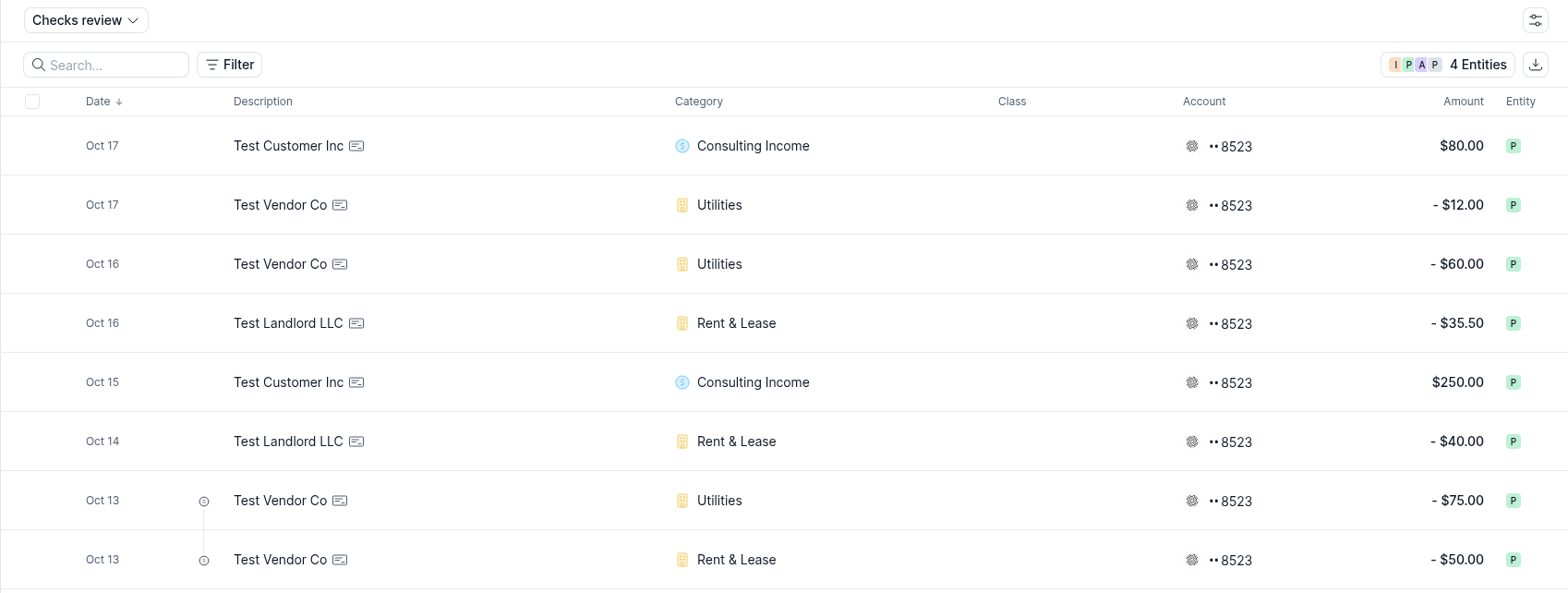
To see what's still outstanding, open the view menu at the top left of the Transactions tab (it shows **All Transactions** by default) and select **Checks review**. This view lists every check and deposit that hasn't been cleared or included in a completed reconciliation.
#### Check and Deposit Detail report
The **Check and Deposit Detail** report lists recorded checks and deposits by bank account over a date range, with their counterparty, account, and reconciliation status.
→ [Check and Deposit Detail](/accountants/reports/check-and-deposit-detail.md)
***
### Clearing them in reconciliation
When the account has checks or deposits outstanding through the statement end date, reconciliation adds a third step, **Clear outstanding checks and deposits**. You match each one to the bank transaction that cleared it, or leave it outstanding for a later reconciliation.
→ [Clear checks and deposits in reconciliation](/accountants/bookkeeping-workflows/checks-and-deposits/clear-checks-in-reconciliation.md)
***
### FAQs
Can I delete a check?
Only while it's outstanding. A check or deposit that's included in a completed reconciliation, or that has been cleared, can't be deleted. Undo the reconciliation first.
Does a check need a reference number?
No. **Reference number** is optional, and matching doesn't use it.
### Related articles
* [Reconciliation](/accountants/close-workflows/reconciliation.md)
* [Locks](/accountants/close-workflows/locks.md)
---
# Agent Instructions
This documentation is published with GitBook. GitBook is the documentation platform designed so that both humans and AI agents can read, navigate, and reason over technical content effectively. Learn more at gitbook.com.
## Querying This Documentation
If you need additional information that is not directly available in this page, you can query the documentation by asking a question.
Perform an HTTP GET request on the following URL with the `ask` and `goal` query parameters:
```
GET https://docs.kick.co/accountants/bookkeeping-workflows/checks-and-deposits.md?ask=&goal=
```
`ask` is the immediate question: it should be specific, self-contained, and written in natural language.
`goal` is what the user is ultimately trying to achieve, the reason they need the answer. Sharing it helps GitBook give you a better, more relevant answer. A goal is most helpful when it describes the outcome the user wants rather than restating the question. For example, with `ask=how do I create an API token`, a goal like `automate deployments from our CI pipeline` lets GitBook tailor the answer to that use case.
The response will contain a direct answer to the question and relevant excerpts and sources from the documentation.
Use this mechanism when the answer is not explicitly present in the current page, you need clarification or additional context, or you want to retrieve related documentation sections.